The MTL Plugin for FFmpeg#
Notice#
FFmpeg is an open source project licensed under LGPL and GPL. See https://www.ffmpeg.org/legal.html. You are solely responsible for determining if your use of FFmpeg requires any additional licenses. Intel is not responsible for obtaining any such licenses, nor liable for any licensing fees due, in connection with your use of FFmpeg.
1. Build#
You can use the ./build.sh that will build the script for you automatically,
apt-get install wget patch unzip
# in the  ecosystem/ffmpeg_plugin/ folder
./build.sh
The manual way of building is described below
1.1. Build openh264#
Before building, check which openh264 is already installed, if any:
pkg-config --modversion openh264
If it prints the OPENH264_VER from versions.env or a later version, skip the build step below. An older openh264 has known vulnerabilities, so build the pinned version.
Note:
$mtl_source_codeshould be pointed to top source code tree of Media Transport Library.
. $mtl_source_code/versions.env

git clone https://github.com/cisco/openh264.git
cd openh264
git checkout "v${OPENH264_VER}"
make -j "$(nproc)"
sudo make install
sudo ldconfig
cd ../
1.2. Build FFmpeg with MTL patches#
Note:
$mtl_source_codeshould be pointed to top source code tree of Media Transport Library.
. $mtl_source_code/versions.env

git clone https://github.com/FFmpeg/FFmpeg.git
cd FFmpeg
git checkout release/${FFMPEG_VERSION}
# apply the build patch
git am $mtl_source_code/ecosystem/ffmpeg_plugin/${FFMPEG_VERSION}/*.patch
# copy the mtl in/out implementation code
cp $mtl_source_code/ecosystem/ffmpeg_plugin/mtl_*.c -rf libavdevice/
cp $mtl_source_code/ecosystem/ffmpeg_plugin/mtl_*.h -rf libavdevice/
# build with --enable-mtl, customize the option as your setup
./configure --enable-shared --disable-static --enable-pic --enable-libopenh264 --enable-encoder=libopenh264 --enable-mtl
make -j
sudo make install
sudo ldconfig
Note: For FFmpeg version 4.4 or 6.1, export
FFMPEG_VERSION=4.4or 6.1.
In order to build the FFmpeg in a non-default path, use --prefix="<path>" within the ./configure command to point to an empty installation folder.
2. ST20P raw video run guide#
The MTL ST20P plugin is implemented as an FFmpeg input/output device, enabling direct reading from or sending raw video via the ST 2110-20 stream.
Note: The default
payload_typevalue for Media Transport Library raw video is 112. Below, it is changed to 96 - a commonly used number for raw video transmissions.
2.1. St20p input#
Reading a ST 2110-20 10-bit YUV422 stream on 239.168.85.20:20000 with payload_type 96:
ffmpeg -p_port 0000:af:01.0 -p_sip 192.168.96.2 -p_rx_ip 239.168.85.20 -udp_port 20000 -payload_type 96 -fps 59.94 -pix_fmt yuv422p10le -video_size 1920x1080 -f mtl_st20p -i "k" -f rawvideo /dev/null -y
Following error indicates that MTL cannot detect a video stream on the listening address.
[mtl_st20p @ 0x55634f8b3c80] mtl_st20p_read_packet(0), st20p_rx_get_frame timeout
[in#0/mtl_st20p @ 0x55634f8b3b40] Error during demuxing: Input/output error
[in#0/mtl_st20p @ 0x55634f8b3b40] Error retrieving a packet from demuxer: Input/output error
[vost#0:0/rawvideo @ 0x55634f8bcc80] No filtered frames for output stream, trying to initialize anyway.
Reading two ST 2110-20 10-bit YUV422 stream, one on 239.168.85.20:20000 and the second on 239.168.85.20:20002:
ffmpeg -p_port 0000:af:01.0 -p_sip 192.168.96.2 -p_rx_ip 239.168.85.20 -udp_port 20000 -payload_type 96 -fps 59.94 -pix_fmt yuv422p10le -video_size 1920x1080 -f mtl_st20p -i "1" -p_port 0000:af:01.0 -p_rx_ip 239.168.85.20 -udp_port 20002 -payload_type 96 -fps 59.94 -pix_fmt yuv422p10le -video_size 1920x1080 -f mtl_st20p -i "2" -map 0:0 -f rawvideo /dev/null -y -map 1:0 -f rawvideo /dev/null -y
Reading a ST 2110-20 10-bit YUV422 stream on 239.168.85.20:20000 with payload_type 96, and use libopenh264 to encode the stream to out.264 file:
ffmpeg -p_port 0000:af:01.0 -p_sip 192.168.96.2 -p_rx_ip 239.168.85.20 -udp_port 20000 -payload_type 96 -fps 59.94 -pix_fmt yuv422p10le -video_size 1920x1080 -f mtl_st20p -i "k" -c:v libopenh264 out.264 -y
2.2. St20p output#
Reading from a yuv stream from a local file and sending a ST 2110-20 10-bit YUV422 stream on 239.168.85.20:20000 with payload_type 96:
ffmpeg -stream_loop -1 -video_size 1920x1080 -f rawvideo -pix_fmt yuv422p10le -i yuv422p10le_1080p.yuv -filter:v fps=59.94 -p_port 0000:af:01.1 -p_sip 192.168.96.3 -p_tx_ip 239.168.85.20 -udp_port 20000 -payload_type 96 -f mtl_st20p -
2.2.1 Additional NIC port options (multi-BDF)#
The TX path supports additional NIC bindings beyond primary/redundant by using:
-p2_port/-p2_sip-p3_port/-p3_sip-p4_port/-p4_sip-p5_port/-p5_sip-p6_port/-p6_sip-p7_port/-p7_sip
Each *_port expects a PCI BDF (for example 0000:af:01.2) and each *_sip is the
source IP bound to that NIC.
Example with two additional NICs:
ffmpeg -stream_loop -1 -video_size 1920x1080 -f rawvideo -pix_fmt yuv422p10le -i yuv422p10le_1080p.yuv -filter:v fps=59.94 -p_port 0000:af:01.1 -p_sip 192.168.96.3 -p2_port 0000:af:01.2 -p2_sip 192.168.97.3 -p3_port 0000:af:01.3 -p3_sip 192.168.98.3 -p_tx_ip 239.168.85.20 -udp_port 20000 -payload_type 96 -f mtl_st20p -
2.3. Supported pixel formats#
The mtl_st20p plugin maps the following FFmpeg pix_fmt values to MTL frame
formats. The same -pix_fmt must be used on TX and RX.
|
Wire format |
ST 2110-20:2022 §6.2 compliant |
|---|---|---|
|
YUV 4:2:2 10-bit RFC 4175 PG2BE10 |
yes (Table 2) |
|
YUV 4:4:4 10-bit RFC 4175 PG4BE10 |
yes (Table 1) |
|
YUV 4:2:2 12-bit RFC 4175 PG2BE12 |
yes (Table 2) |
|
YUV 4:4:4 12-bit RFC 4175 PG2BE12 |
yes (Table 1) |
|
YUV 4:2:2 10-bit RFC 4175 PG2BE10 |
yes (Table 2) |
|
YUV 4:2:2 8-bit RFC 4175 |
yes (Table 2) |
|
RGB 4:4:4 10-bit RFC 4175 PG4BE10 |
yes (Table 1) |
|
RGB 4:4:4 12-bit RFC 4175 PG2BE12 |
yes (Table 1) |
|
Planar I420 passthrough ( |
no — MTL-to-MTL only, not interoperable with third-party receivers |
3. ST22 compressed video run guide#
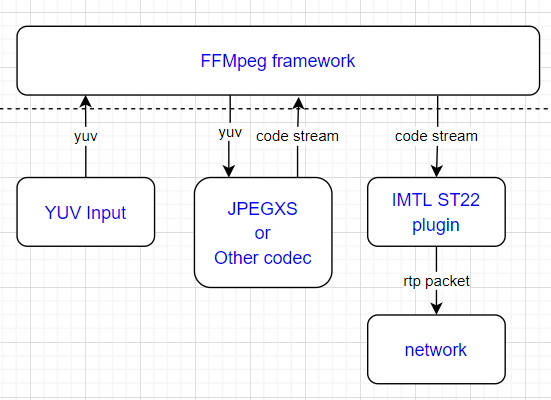
A typical workflow for processing an MTL ST22 compressed stream with FFmpeg is outlined in the following steps: Initially, FFmpeg reads a YUV frame from the input source, then forwards the frame to a codec to encode the raw video into a compressed codec stream. Finally, the codec stream is sent to the MTL ST22 plugin. The MTL ST22 plugin constructs the codec stream and transmits it as ST 2110-22 RTP packets, adhering to the standard. In addition to the JPEG XS stream, the MTL ST22 plugin is capable of supporting various other common compressed codecs, including H.264 (AVC), and H.265 (HEVC), among others.
Note: The default
payload_typevalue for Media Transport Library compressed video is 112. Below, it is changed to 98 - a commonly used number for compressed video transmissions.
3.1. St22 output#
Reading from a yuv stream from local source file, encode with h264 codec and sending a ST 2110-22 codestream on 239.168.85.20:20000 with payload_type 98:
ffmpeg -stream_loop -1 -video_size 1920x1080 -f rawvideo -pix_fmt yuv420p -i yuv420p_1080p.yuv -filter:v fps=59.94 -c:v libopenh264 -p_port 0000:af:01.1 -p_sip 192.168.96.3 -p_tx_ip 239.168.85.20 -udp_port 20000 -payload_type 98 -f mtl_st22 -
3.2. St22 input#
Reading a ST 2110-22 codestream on 239.168.85.20:20000 with payload_type 98, decode with FFmpeg h264 codec:
ffmpeg -p_port 0000:af:01.0 -p_sip 192.168.96.2 -p_rx_ip 239.168.85.20 -udp_port 20000 -payload_type 98 -fps 59.94 -video_size 1920x1080 -st22_codec h264 -f mtl_st22 -i "k" -f rawvideo /dev/null -y
3.3. SVT JPEG XS#
Make sure the FFmpeg is build with both MTL and SVT JPEG XS plugin:
# start rx
ffmpeg -p_port 0000:af:01.0 -p_sip 192.168.96.2 -p_rx_ip 239.168.85.20 -udp_port 20000 -payload_type 98 -fps 59.94 -video_size 1920x1080 -st22_codec jpegxs -timeout_s 10 -f mtl_st22 -i "k" -vframes 10 -f rawvideo /dev/null -y
# start tx
ffmpeg -stream_loop -1 -video_size 1920x1080 -f rawvideo -pix_fmt yuv420p -i yuv420p_1080p.yuv -filter:v fps=59.94 -c:v libsvt_jpegxs -p_port 0000:af:01.1 -p_sip 192.168.96.3 -p_tx_ip 239.168.85.20 -udp_port 20000 -payload_type 98 -f mtl_st22 -
3.4. SVT HEVC#
Make sure the FFmpeg is build with both MTL and SVT HEVC plugin:
# start rx
ffmpeg -p_port 0000:af:01.0 -p_sip 192.168.96.2 -p_rx_ip 239.168.85.20 -udp_port 20000 -payload_type 98 -fps 59.94 -video_size 1920x1080 -st22_codec h265 -timeout_s 10 -f mtl_st22 -i "k" -vframes 10 -f rawvideo /dev/null -y
# start tx
ffmpeg -stream_loop -1 -video_size 1920x1080 -f rawvideo -pix_fmt yuv420p -i yuv420p_1080p.yuv -filter:v fps=59.94 -c:v libsvt_hevc -p_port 0000:af:01.1 -p_sip 192.168.96.3 -p_tx_ip 239.168.85.20 -udp_port 20000 -payload_type 98 -f mtl_st22 -
3.5. St22p support#
Another option involves utilizing the MTL built-in ST22 codec plugin, where FFmpeg can directly send or retrieve the YUV raw frame to/from the MTL ST22P plugin. MTL will then internally decode or encode the codec stream.
Reading a ST 2110-22 pipeline jpegxs codestream on 239.168.85.20:20000 with payload_type 98:
ffmpeg -p_port 0000:af:01.0 -p_sip 192.168.96.2 -p_rx_ip 239.168.85.20 -udp_port 20000 -payload_type 98 -st22_codec jpegxs -fps 59.94 -pix_fmt yuv422p10le -video_size 1920x1080 -f mtl_st22p -i "k" -f rawvideo /dev/null -y
Reading from a yuv file and sending a ST 2110-22 pipeline jpegxs codestream on 239.168.85.20:20000 with payload_type 98:
ffmpeg -stream_loop -1 -video_size 1920x1080 -f rawvideo -pix_fmt yuv422p10le -i yuv422p10le_1080p.yuv -filter:v fps=59.94 -p_port 0000:af:01.1 -p_sip 192.168.96.3 -p_tx_ip 239.168.85.20 -udp_port 20000 -payload_type 98 -st22_codec jpegxs -f mtl_st22p -
4. ST30P audio run guide#
Note: The default
payload_typevalue for Media Transport Library raw audio is 111. Below, it is changed to 97 - a commonly used number for raw audio transmissions.
4.1. St30p input#
Reading a ST 2110-30 stream (pcm24, 1ms packet time, 2 channels) on 239.168.85.20:30000 with payload_type 97 and encoded to a wav file:
ffmpeg -p_port 0000:af:01.0 -p_sip 192.168.96.2 -p_rx_ip 239.168.85.20 -udp_port 30000 -payload_type 97 -pcm_fmt pcm24 -ptime 1ms -channels 2 -f mtl_st30p -i "0" dump.wav -y
4.2. St30p output#
Reading from a wav file and sending a ST 2110-30 stream (pcm24, 1ms packet time, 2 channels) on 239.168.85.20:30000 with payload_type 97:
ffmpeg -stream_loop -1 -i test.wav -p_port 0000:af:01.1 -p_sip 192.168.96.3 -p_tx_ip 239.168.85.20 -udp_port 30000 -payload_type 97 -ptime 1ms -f mtl_st30p -
4.3. St30p pcm16 example#
For pcm16 audio, use mtl_st30p_pcm16 muxer, set pcm_fmt to pcm16 for demuxer.
ffmpeg -stream_loop -1 -i test.wav -p_port 0000:af:01.1 -p_sip 192.168.96.3 -p_tx_ip 239.168.85.20 -udp_port 30000 -payload_type 97 -ptime 1ms -f mtl_st30p_pcm16 -

ffmpeg -p_port 0000:af:01.0 -p_sip 192.168.96.2 -p_rx_ip 239.168.85.20 -udp_port 30000 -payload_type 97 -pcm_fmt pcm16 -ptime 1ms -channels 2 -f mtl_st30p -i "0" dump_pcm16.wav -y
5. St20 GPU direct guide#
The MTL_GPU_DIRECT experimental feature aims at enhancing FFmpeg’s performance by allowing direct access to GPU memory, which can be particularly beneficial when working with high-throughput video streams such as those handled by the MTL ST20 codec plugin.
5.1. Enabling experimental MTL_GPU_DIRECT in FFmpeg with ST20p Support#
To take advantage of the MTL_GPU_DIRECT feature FFmpeg has to be built with this option enabled. Here’s how to do it:
./configure --enable-shared --disable-static --enable-pic --enable-libopenh264 --enable-encoder=libopenh264 --enable-mtl --extra-cflags="-DMTL_GPU_DIRECT_ENABLED"
or use
./build_ffmpeg_plugin.sh -g
Reading a ST 2110-20 10-bit YUV422 stream on 239.168.85.20:20000 with payload_type 96 and enabled gpu_direct:
./ffmpeg -p_port 0000:af:01.0 -p_sip 192.168.96.2 -p_rx_ip 239.168.85.20 -udp_port 20000 -payload_type 96 -fps 59.94 -pix_fmt yuv422p10le -video_size 1920x1080 -gpu_direct 1 -gpu_driver 0 -gpu_device 0 -f mtl_st20p -i "k" -f rawvideo /dev/null -y
5.2. Additional Notes#
GPU Direct Flag: When compiling FFmpeg with the MTL_GPU_DIRECT feature enabled, ensure that your system’s GPU drivers and hardware support direct GPU memory access.
GPU device IDs and GPU driver IDs are printed during initialization.
Options:
-gpu_device-gpu_driver
Both default to 0, but if your device doesn’t initialize, adjust it using the information printed during initialization.
Example:
Drivers count: 1
Driver: 0: Device: 0: Name: Intel(R) Data Center GPU Flex 170, Type: 1, VendorID: 8086, DeviceID: 22208
By following these steps, you can effectively build and utilize FFmpeg with the MTL_GPU_DIRECT feature enabled.